

Automation can save time, reduce errors, and improve customer experience, but not everything should be automated at once. Learn which business processes are worth automating first.
“Which part of the business slows us down the most, and is the process already clear enough to automate?”
Automation Is Not About Replacing People
A common misconception is that automation is only about replacing human work. In reality, good automation is about removing repetitive, low-value tasks from the team’s daily workload. Your team should still make decisions, build relationships, solve problems, and handle work that needs judgment. Automation should help with things like:
Sending reminders
Updating task status
Routing enquiries
Generating reports
Recording activity logs
Sending standard follow-ups
Notifying the right person
Reducing duplicate data entry
Moving data between connected systems
The goal is not to remove the human side of the business. The goal is to help people work with better focus, fewer manual steps, and less operational noise.
Start with the Tasks That Happen Every Day
The best automation opportunities usually come from repetitive daily tasks. These are small activities that may not look serious at first, but they quietly take time every single day.
For example:
Copying customer data from chat into a spreadsheet
Reminding the sales team to follow up with leads
Checking unpaid invoices manually
Updating project status across multiple tools
Sending the same message to new enquiries
Preparing weekly reports from different files
Asking team members for updates one by one
If a task happens often, follows a predictable pattern, and does not require deep human judgment, it may be a good candidate for automation. The key is to start small. A simple automation that saves 15 minutes every day can create more value than a complex automation that nobody uses properly.
What Makes a Process Ready for Automation?
Before automating anything, check whether the process is clear.
A process is usually ready for automation when:
The steps are already known
The trigger is clear
The expected outcome is clear
The required data is available
The rules do not change too often
The team agrees on how the process should work
There is a measurable benefit if the task becomes faster
For example, “send a follow-up reminder three days after a proposal is sent” is a clear process. But “handle all customer communication automatically” is too broad. Good automation starts with specific rules. The clearer the rule, the easier the automation.
1. Automate Customer Follow-Ups First
For many businesses, customer follow-up is one of the easiest and most valuable places to start. Why?
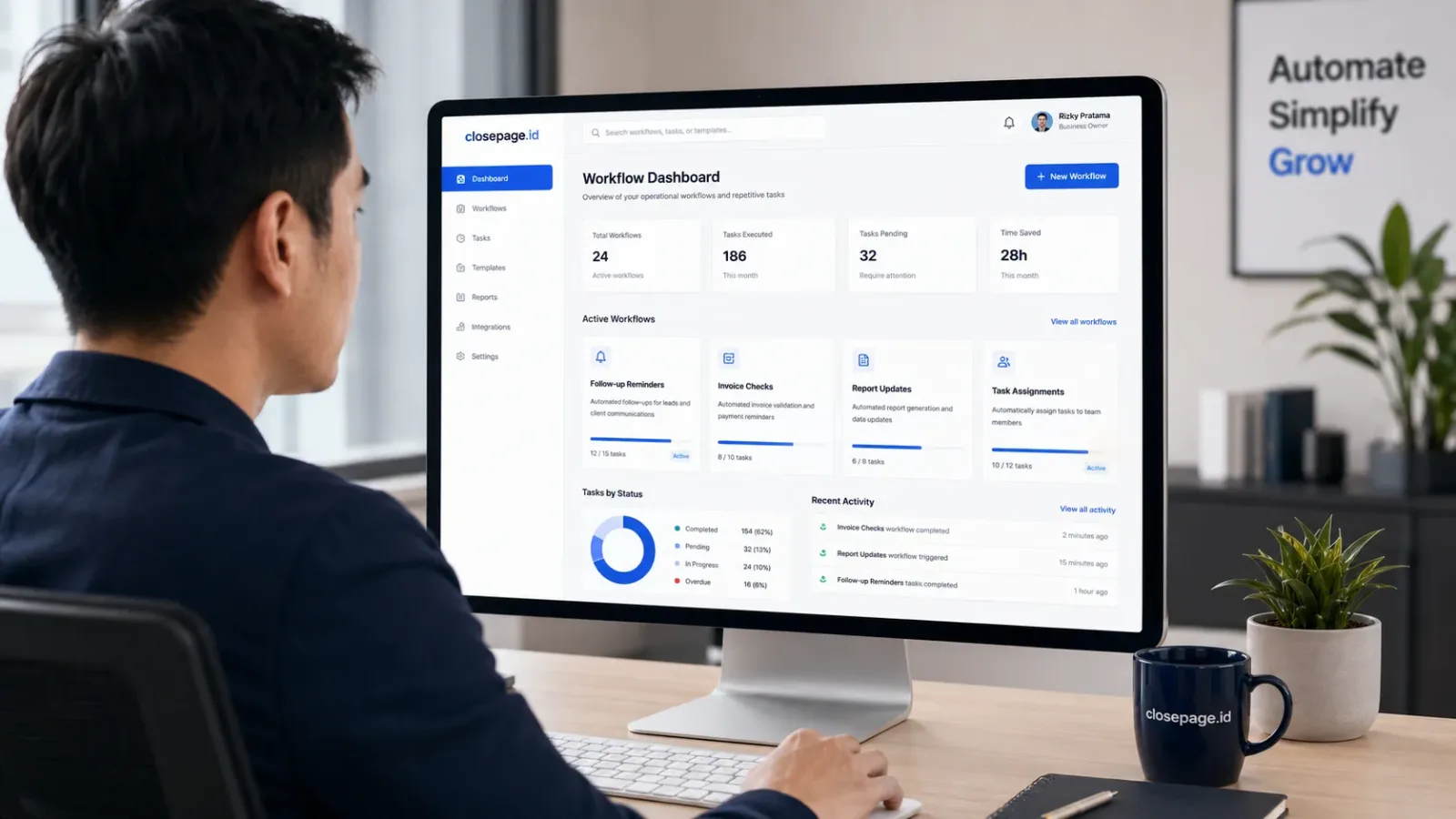
Because missed follow-ups directly affect revenue. A lead may be interested today, but if nobody follows up for several days, the opportunity can disappear. A customer may ask for an update, but if the message is buried in chat, the team may forget to respond. Automation can help by creating reminders, assigning leads, or moving enquiries into the next workflow stage.
For example:
New enquiry received
Lead assigned to sales team
Follow-up reminder created
Proposal sent
Reminder triggered after three days
Lead status updated after response
Manager notified if the lead is inactive too long
This kind of automation does not replace the salesperson. It helps the salesperson stay consistent. The conversation is still human. The reminder is automated.
2. Automate Task Assignment and Status Updates
As teams grow, task ownership becomes more important. Without clear assignment, work can easily fall into the “I thought someone else handled it” zone. Automation can help by assigning tasks based on rules.
For example:
A new website enquiry goes to the sales team
A paid invoice triggers an operations task
A new project automatically creates onboarding tasks
A support request is assigned based on category
A delayed task sends a notification to the manager
This gives the team a clearer view of who owns what. It also reduces the need for constant manual coordination. Instead of asking, “Who is handling this?”, the system already shows the owner, status, and next step.
3. Automate Invoice and Payment Reminders
Finance-related tasks are another strong candidate for automation. Manual invoice tracking can become messy, especially when the business handles many customers, recurring payments, or project-based billing. Automation can help with:
Invoice due date reminders
Payment confirmation updates
Overdue invoice alerts
Internal finance notifications
Customer payment reminders
Status changes from unpaid to paid
Monthly billing summaries
This reduces the risk of forgotten invoices and delayed payment follow-ups. It also gives business owners better visibility over cash flow. The important thing is to keep the message professional and controlled. Payment reminders should feel clear, not aggressive. A good system helps the finance team stay consistent without making customer communication feel robotic.
4. Automate Reports That Take Too Long to Prepare
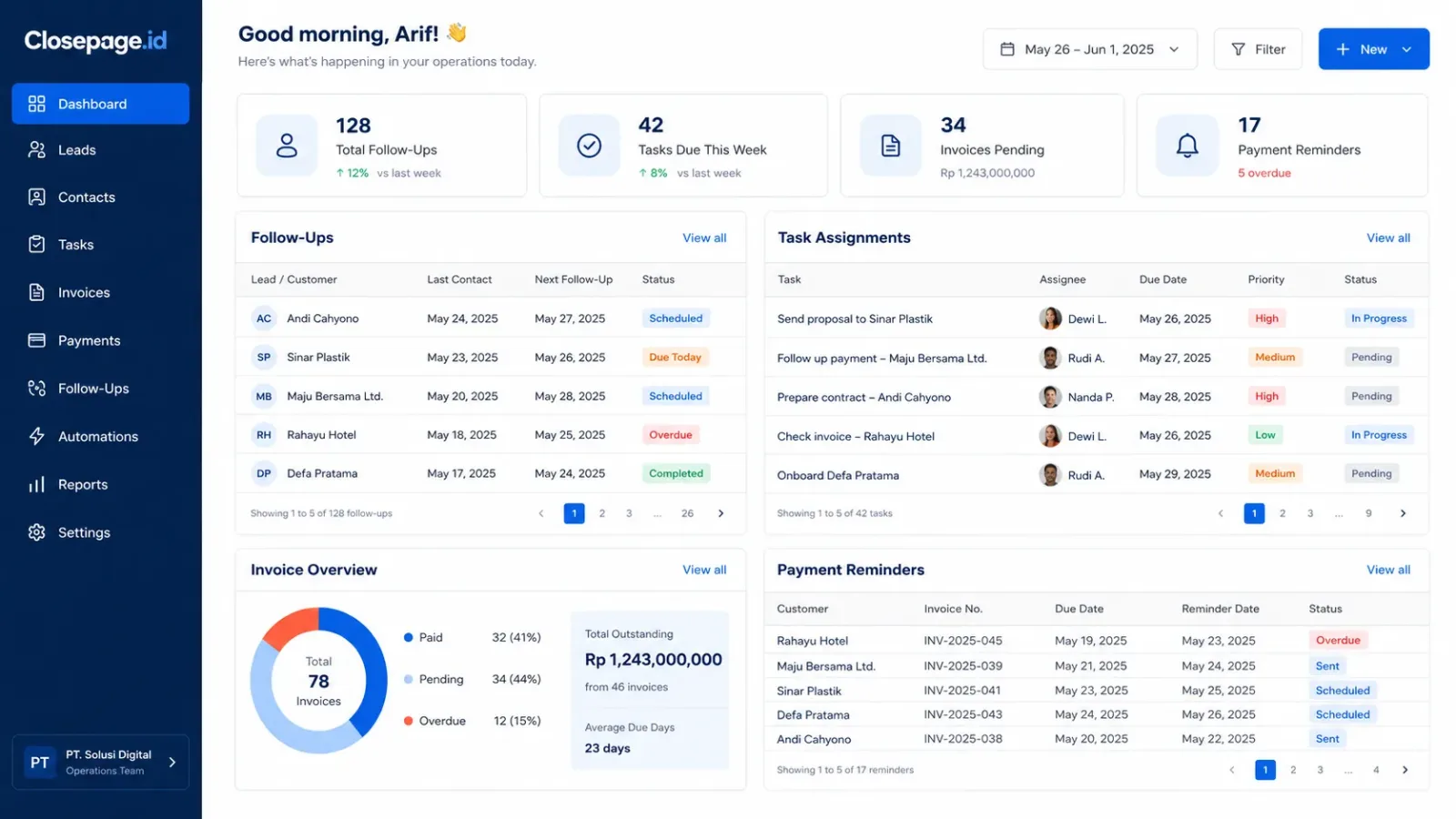
Many teams spend too much time preparing reports manually. The data may come from spreadsheets, chat updates, invoice records, project boards, or separate apps. By the time the report is finished, the information may already be outdated. Automation can help by pulling data into a dashboard or generating recurring summaries.
For example:
Weekly sales report
Monthly revenue summary
Lead conversion report
Project progress report
Outstanding invoice report
Customer activity report
Team task completion report
Reporting automation gives leaders faster visibility. Instead of waiting for someone to prepare a report manually, business owners can open a dashboard and see the latest status. This does not mean every report needs to be fully automated from day one. Start with the report that takes the most time or supports the most important decisions.
5. Automate Data Movement Between Tools
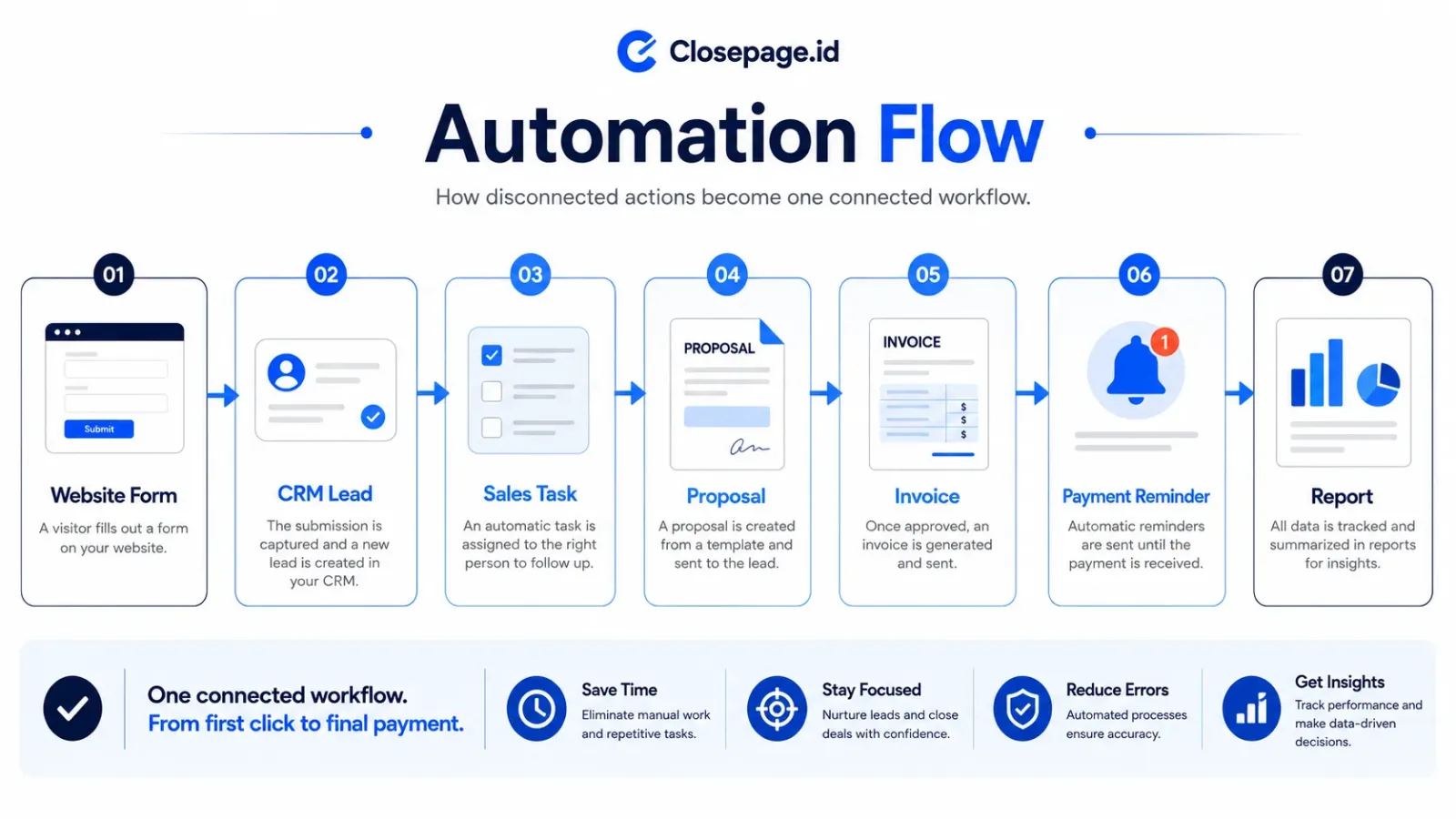
Disconnected tools are one of the biggest sources of manual work. A customer fills out a website form. Then someone copies the data into a spreadsheet. Then the sales team sends a message. Then someone updates a CRM. Then finance creates an invoice. Every manual transfer creates a chance for delay or error. Automation can connect these steps.
For example:
Website form submission creates a new lead
New lead triggers a sales notification
Proposal status updates the CRM
Paid invoice updates the customer record
Completed project triggers a feedback request
New support request creates a ticket
This kind of automation is powerful because it reduces duplicate work. However, it should only be built once the workflow is clear. If the business process is still changing every week, keep the automation simple and flexible.
6. Automate Internal Notifications
Not every automation needs to be complex. Sometimes, a simple notification can improve the workflow significantly.
For example:
Notify sales when a new lead comes in
Notify finance when payment is uploaded
Notify operations when a project is approved
Notify management when a task is overdue
Notify support when a customer issue is reopened
Notify the team when a status changes
Good notifications help people act at the right time. But be careful. Too many notifications can create noise. The best automation sends the right information to the right person at the right moment.
What You Should Not Automate Too Early
Automation is useful, but there are areas where businesses should be careful. Do not automate a process too early if:
The workflow is not yet agreed by the team
The rules change too often
The data is incomplete or unreliable
The customer experience still needs human judgment
The process involves complex negotiation
The automation may create confusing messages
Nobody owns the process internally
The team does not know what should happen after the automation runs
Bad automation can create bad customer experience. For example, sending automatic follow-ups without checking the customer context may feel careless. Updating a status automatically without validation may create incorrect data. Sending too many notifications may make the team ignore important alerts. Automation should make the business clearer, not louder.
A Simple Automation Priority Framework
To decide what to automate first, use this simple framework.
1. Frequency
How often does the task happen? Daily tasks usually have higher automation value than tasks that happen once a month.
2. Time Cost
How much time does the task take? A task that takes 10 minutes but happens 20 times a week may be more important than a task that takes one hour but happens rarely.
3. Error Risk
How often does the task create mistakes? If manual data entry causes frequent errors, automation can reduce operational risk.
4. Revenue Impact
Does the task affect leads, sales, payments, or customer retention? If yes, it should be prioritised.
5. Process Clarity
Is the workflow already clear enough? If the answer is no, fix the process first. The best first automation usually scores high in frequency, time cost, error risk, or revenue impact—and has a clear process.
Automation Works Best After the Digital Foundation Is Ready
Automation becomes much more useful when the business already has a solid digital foundation. That means customer data is structured. Workflows are visible. Roles are clear. Reports are connected. The system already knows what information matters. Without that foundation, automation often becomes a patch. It may solve one small problem while creating another. For example, if customer data is messy, automated follow-ups may go to the wrong person. If invoice status is inaccurate, automated reminders may create confusion. If task ownership is unclear, automated notifications may go nowhere useful. So before going too far with automation, make sure the basics are ready.
Clean data first.
Clear workflow first.
Then automate.
Start Small, Measure, Then Improve
The best automation strategy is not to build everything at once. Start with one workflow.
For example:
Lead follow-up reminders
Invoice due date alerts
Weekly report summaries
Customer onboarding tasks
Support ticket assignment
Internal approval notifications
Then measure the result.
Did it save time?
Did it reduce errors?
Did follow-ups become more consistent?
Did the team actually use it?
Did the customer experience improve?
If the answer is yes, improve it and expand gradually. That is how automation becomes practical and sustainable.
Final Thoughts
Automation can help a business move faster, reduce manual work, and improve consistency.But the best automation is not the most complex one.It is the one that removes real friction from daily operations. Start with tasks that are repetitive, time-consuming, easy to define, and connected to revenue, customer experience, or operational clarity.
Do not automate chaos. Understand the process first. Build the foundation. Then automate what slows the business down.
Closepage.id helps businesses design and build practical automation workflows, from customer follow-ups and task assignments to invoices, reports, dashboards, integrations, and custom systems that support real business operations.